
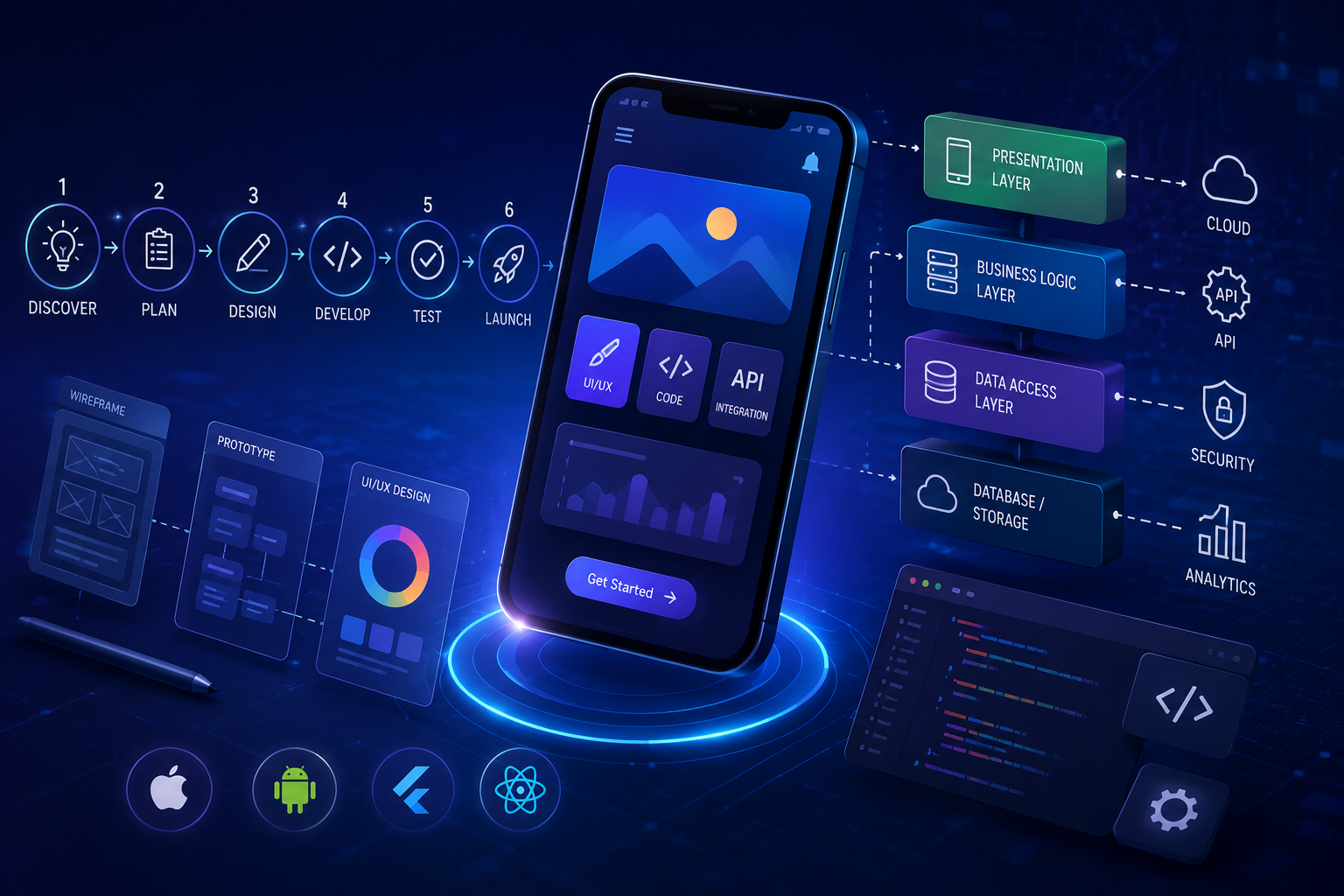
Mobile app development is the process of creating software applications that run on mobile devices like smartphones and tablets. It actually depends on your needs, you can choose between native development (perfect for performance using Swift for iOS or Kotlin for android) or cross-platform tools to build for both at once.
- Cross-Platform – write a single codebase using flutter or React Native to deploy to both the APP Store and Google Play Store, saving time and resources.
- Native – build separated apps in Xcode for iOS or Android Studio for Android when you need maximum hardware control and top-tier performance.
Mobile app development Process – step-by-step structured development lifecycle
It’s easy enough to think of great mobile app ideas but much harder to implement them. Here we explore what it really takes to design, develop, and promote a high-quality mobile app. The mobile app development lifecycle is a structured framework that guides a project from concept to launch and beyond. The key stages include strategy and research, UI/UX design, coding and development, and testing and deployment. Following a step-by-step process helps lower risks and control costs while building a user-friendly product
Identify the purpose and Product Discovery
The best mobile app ideas are the ones that solve problems for users, especially those for which there are no other solutions or those that people didn’t even realize were an issue. Your mobile app development process must clear business outcomes before any design or code begins, which is why starting with a solid mobile app business plan sets the right foundation.
Start with measurable targets. Avoid vague goals like”better engagement”. Define metrics that can be tracked from day one.
- Revenue impact : conversion rate, average order value, repeat purchase rate
- Cost reduction : manual hours saved, process cycle time, error rates
- Customer experience: retention rate, session time task completion rate
Requirements, Analysis, and Planning
Now you turn the idea into something a team can actually build.
Key activities:
- Functional requirements: what the app must do (user stories, use cases).
- Non‑functional requirements: performance, security, offline needs, scalability, compliance.
- Platform & tech decisions: native (Swift/Kotlin), cross‑platform (Flutter, React Native, etc.), backend stack, third‑party APIs.
- Project planning: timeline, milestones, budget, roles, and
Deliverables:
- Requirements specification (even a lightweight one)
- Tech stack decision
- Initial release plan (MVP scope + later versions)
UX/UI Design (Wireframes → Prototype → Visual Design)
Here you define how users will interact with the app and what it will look like.
Key activities:
- UX flows and wireframes: screens and navigation without visual polish, focusing on user journeys.
- Interactive prototype: click‑through prototype to validate flows and catch UX issues early.
- Visual UI design: colors, typography, components, and design system that match the brand.
Deliverables:
- Wireframes for all key screens
- Interactive prototype (Figma, XD, etc.)
- Design assets and style guide for developers
Architecture and Technical Setup
Before heavy coding, decide the structure of the system. Choose the technology stack, databases, and server setup to support future growth.
Key activities:
- App architecture: patterns like MVVM, Clean Architecture, or Redux‑style depending on tech stack.
- Backend and API design: endpoints, data models, authentication, and error handling.
- DevOps setup: repositories, branching strategy, CI/CD, environments (dev, staging, production).
Deliverables:
- High‑level architecture diagram
- API contracts
- Project structure created in repos and CI/CD pipeline running basic checks
Development (Frontend + Backend + Integrations)
Now the “build” phase: implement features in small, testable increments.
Common practices:
- Implement features in vertical slices: UI + logic + backend + tests for each slice.
- Follow coding standards and code reviews to keep quality consistent.
- Keep features behind flags or use separate builds for staging vs production.
Typical components:
- Mobile client: screens, navigation, state management, offline caching, input validation.
- Backend: APIs, databases, authentication, push notification services, background jobs.
- Third‑party integrations: analytics, crash reporting, payment gateways, maps, etc.
Deliverables:
- Incrementally working app builds (internal and staging)
- Source code with tests
Testing and Quality Assurance
Testing should not just be a final step; it runs in parallel with development, but there is usually a “hardening” phase before release.
Types of testing:
- Unit and integration tests: verify functions, modules, and API interactions.
- UI/functional testing: ensure user flows work correctly across devices and OS versions.
- Performance and security testing: app startup time, memory usage, API security, data protection.
- Beta testing: release to a small real‑user group via Test Flight, internal testing tracks, etc.
Deliverables:
- Test plans and test results
- Bug backlog and fix status
- “Release candidate” build
Deployment and App Store Release
This is about packaging, compliance, and publishing.
Key activities:
- App store assets: name, description, screenshots, preview video, privacy policy, and support info.
- Build and signing: generate signed builds for iOS and Android with the right configuration.
- Store submission and review: handle App Store review guidelines and Play Store policies.
- Rollout strategy: phased rollout, country selection, monitoring crash and analytics dashboards.
Deliverables:
- Live app in App Store / Play Store
- Store listings and release notes
Maintenance, Monitoring, and Iteration
After launch, the app enters an ongoing cycle of improvement.
Key activities:
- Monitor: crashes, performance, user analytics, and store reviews.
- Bug fixes and compatibility updates for new OS or device changes.
- Feature iteration: revisit the lifecycle for new features (discovery → design → dev → test → deploy).
Deliverables:
- Regular releases (patches and feature updates)
- Roadmap updated based on real usage data
Types of mobile app development in large businesses
Large businesses categorize mobile app development by technical architecture—primarily Native, Cross-Platform, and Hybrid/PWA approaches—tailored to internal operations or customer engagement. Large businesses usually think about “types of mobile app development” along three axes:
- By technology approach (how the app is built)
- By audience (who uses it)
- By business use case (what it does)
Below is a structured view of all three, which is how big companies typically categorize their app portfolio.
Technical architecture types
- Native Development: Built specifically for one operating system using languages like Swift (iOS) or Kotlin/Java (Android). Large corporations use this for high-security, performance-heavy tools like mobile banking or complex customer portals.
- Cross-Platform Development: Uses a single shared codebase (via frameworks like Flutter or React Native) to deploy on both iOS and Android. Enterprises favor this to reduce build costs and time for standard business tools.
- Hybrid & Web Apps (PWAs): Combines web tech (HTML, CSS, JS) with native device wrappers. Large firms use progressive web apps for quick-launch internal portals that bypass app store distribution rules.
By audience in large enterprises
These types are about who the app is for.
- Customer‑facing (B2C) apps
- Serve end customers: shopping, banking, booking, support, loyalty, etc.
- Focus on UX, performance, personalization, and scale (millions of users).
- Partner / B2B apps
- Built for business partners, distributors, vendors, agents.
- Integrate with enterprise systems (ERP, CRM) and support workflows like ordering, approvals, field sales.
- Internal / enterprise / employee apps
- For employees only: field service, HR, time tracking, inventory, dashboards, approvals.
- Security, integration, and role‑based access are critical.
By business use case
These types reflect what the app does. Large organizations usually have several of these in parallel.
- E‑commerce and retail apps
- For browsing products, placing orders, payments, and order tracking.
- Common in retail, CPG, and D2C brands.
- On‑demand / service apps
- Connect users to services (delivery, transport, home services, reservations).
- Real‑time tracking, multi‑sided (customer, provider, admin).
- Productivity and workflow apps
- Task management, approvals, project tracking, document handling.
- Used heavily inside large enterprises to digitize processes.
- Finance and fintech apps
- Banking, payments, wallets, investments.
- Strong focus on security, compliance, and reliability.
- Analytics and reporting apps
- Dashboards, KPIs, BI for executives and managers.
- Often internal, cross‑platform, tightly integrated with data warehouses.
- Industry‑specific apps
- Healthcare (patient portals, clinician tools), logistics (fleet tracking), manufacturing (plant monitoring), education (learning portals), etc.
- Heavy regulatory and integration requirements.
How big companies combine these
In a large business, a portfolio might look like:
| Dimension | Example in a large bank |
| Technology | Native customer app; cross‑platform staff app |
| Audience | B2C customer app; internal RM/sales app |
| Use case | Consumer banking; wealth management; approvals |
So a single enterprise could simultaneously have:
- A native B2C finance app for retail customers,
- A cross‑platform internal productivity app for employees, and
- A PWA for light, anonymous customer browsing.
enterprise mobile app development – what powers Scalability?
Scalability in enterprise mobile app development is powered by cloud-native infrastructure, modular microservices, and dynamic load balancing. These core pillars allow applications to handle massive user growth and traffic spikes without losing speed or stability.
Infrastructure and Backend
- Cloud Hosting: Utilizing elastic platforms like AWS or Google Cloud to dynamically scale server resources up or down based on current user demand.
- Load Balancing: Distributing incoming network traffic across multiple servers to prevent crashes and reduce latency during peak usage.
- Serverless Computing: Letting cloud providers manage backend infrastructure so systems auto-scale instantly without manual server intervention.
Architecture and Data Management
- Microservices: Breaking the app’s backend into independent, loosely coupled modules that can update or scale separately.
- API-Driven Design: Using clean APIs to connect external services, legacy databases, and new features smoothly.
- Smart Caching: Storing frequent queries in tools like Redis to lower database strain and speed up response times.
Mobile App Development cost breakdown for large businesses
Let’s get straight to the point. The cost to develop a mobile app in 2026 ranges from $35,000 to $400,000+, depending on complexity and features. These numbers make more sense when viewed alongside real mobile app benchmarks for 2026 covering enterprise usage, spend, and retention trends. Here’s a fresh breakdown to help you visualize the pricing structure:
| Complexity Level | Estimated Cost | Development Time |
| Basic App | $35,000 – $100,000 | 3 – 6 months |
| Moderate App | $100,000 – $200,000 | 6 – 9 months |
| Advanced App | $200,000 – $400,000 | 9 – 12 months |
| Enterprise-Grade App | $400,000+ | 12–18 months or longer |
Why such a wide range? Think of app development like building a house. A basic studio apartment costs far less than a smart mansion with automated systems, multiple floors, and custom features. Your app’s “architectural complexity” determines the final price tag.
The primary cost drivers are backend infrastructure, advanced security compliance, and multi-platform native development.
Cost Breakdown by Development Stage
- UI/UX Design (15% of budget): $30,000 – $75,000 for enterprise branding, user research, and custom workflows.
- Coding and Development (60% of budget): $120,000 – $300,000 for frontend native iOS/Android or cross-platform code alongside heavy enterprise database syncing.
- Quality Assurance & Testing (10% of budget): $20,000 – $50,000 for rigorous device testing, security stress-testing, and compliance checks.
- Deployment & Launch (5% of budget): $10,000 – $25,000 for app store optimization, multi-tier enterprise rollouts, and server configuration.
- Project Management & Architecture (10% of budget): $20,000 – $50,000 for technical leadership, sprint planning, and stakeholder alignment.
Major Enterprise Cost Drivers
- Backend & System Integrations: Connecting the mobile app to legacy CRM, ERP, or cloud databases (like Salesforce or SAP) adds $50,000 – $150,000.
- Security & Compliance: Meeting strict industry regulations (such as HIPAA, GDPR, or SOC2) requires specialized auditing and encryption layers.
- Advanced Tech Stack: Incorporating artificial intelligence, machine learning models, or real-time data streaming pushes budgets to the high end ($500,000+).
- Ongoing Maintenance: Expect an extra 15% to 25% of the initial development cost every year for server hosting, bug fixes, and continuous OS compatibility updates.
Common mobile app development challenges and solutions.
1. Unclear requirements and shifting scope
Challenge:
Vague goals, changing requirements, and too many stakeholders lead to scope creep, delays, and budget overruns.
Solutions:
- Start with a clear problem statement and success metrics (time saved, revenue, NPS, etc.).
- Use user stories, wireframes, and prototypes to align stakeholders early.miquido+1
- Prioritize features (MVP vs later) and manage scope with a formal backlog and change process.
2. Poor UX and low user adoption
Challenge:
Apps are shipped that look “done” but are confusing, slow, or do not fit real workflows, so employees/customers simply don’t use them.
Solutions:
- Do basic user research and involve real users early (interviews, shadowing, simple prototypes).
- Follow platform guidelines (Material Design, Human Interface Guidelines) and keep flows simple.
- Run usability tests with small groups and iterate before and after launch; monitor behavior with analytics.
3. Device and platform fragmentation
Challenge:
Supporting many OS versions, screen sizes, and device capabilities causes bugs, inconsistent behavior, and high testing effort.
Solutions:
- Analyze your user/device mix and define a “support matrix” (which OS versions/devices you officially support).
- Adopt responsive/adaptive layouts and follow recommended architecture patterns to keep code modular.
- Use cloud device farms and automated UI tests to cover key devices without owning them all.
4. Performance and scalability
Challenge:
Slow startup, laggy screens, battery drain, and backend bottlenecks appear as users, data, and features grow.
Solutions:
- Profile the app regularly; optimize heavy operations, reduce over‑fetching, and use caching wisely.
- Design scalable backend architecture (modular services, proper indexing, caching, async processing).
- Add performance monitoring (APM, crash reporting) and treat performance regressions as high‑priority bugs.
5. Security and compliance
Challenge:
Apps increase the attack surface; weak security or non‑compliance can lead to data breaches and regulatory issues.
Solutions:
- Use secure coding practices (OWASP), strong authentication, encryption in transit and at rest.
- Regularly perform security audits and penetration testing; keep dependencies and libraries updated.
- Align with industry regulations early (e.g., finance, healthcare) and involve security/compliance teams from day one.
6. Integration with legacy and third‑party systems
Challenge:
Connecting to ERPs, CRMs, payment gateways, or legacy APIs can be fragile, slow, and time‑consuming.
Solutions:
- Design an API/integration layer that abstracts legacy systems away from the mobile app.
- Choose well‑documented, reliable third‑party services and plan buffer time just for integration work.
- Add monitoring and fallback strategies for external APIs, and version your own APIs carefully.
7. Budget, time, and resource constraints
Challenge:
Limited budget, not enough skilled mobile developers, and competing priorities lead to delays or half‑finished apps.
Solutions:
- Prioritize ruthlessly: build an MVP and validate before funding “phase 2” features.ishir+1
- Use cross‑platform frameworks when appropriate to reduce duplicated work across iOS and Android.
- Invest in internal capability (training, hiring) or partner with specialized vendors rather than overloading existing teams.
8. Testing, releases, and maintenance
Challenge:
Manual testing doesn’t scale, releases are risky, and apps quickly become outdated without a maintenance plan.
Solutions:
- Introduce automated tests (unit, integration, UI) and CI/CD pipelines for consistent builds and deployments.
- Plan for continuous improvement: monitor crashes, reviews, and usage, and schedule regular releases.
- Budget for maintenance from the start; don’t treat launch as the end of the project.
9. Enterprise‑specific challenges
Challenge:
In large organizations: slow decision cycles, misalignment with business goals, and difficulty keeping up with tech changes.
Solutions:
- Tie the app clearly to business goals and KPIs, and keep executive sponsors actively involved.
- Use agile practices with frequent demos to stakeholders to keep alignment and avoid big surprises late.
- Periodically review architecture and tech stack to avoid getting stuck on outdated tools and patterns.
Mobile App Development Tips
To build a successful mobile app, focus on core user problems, prioritize simple navigation, and track performance metrics from day one. Essential strategies include defining a strict minimum viable product (MVP), choosing the right framework, and testing under real-world conditions.
1. Start with the problem, not the features
- Write one clear sentence: “This app exists to help [who] do [what] faster/better.”
- Define 3–5 core outcomes (time saved, fewer errors, more sales) and use those to decide what goes into v1 and what can wait.
- If a feature doesn’t clearly support those outcomes, park it in a “later” bucket.
2. Design flows before you design screens
- Sketch user journeys first (e.g., “new user → sign up → first success action”) before worrying about colors or components.
- Use low‑fidelity wireframes to align your team and stakeholders quickly; only then invest in detailed UI.
- Aim to make common tasks achievable in as few taps and screens as possible.
3. Choose your tech stack for the next 3 years, not just launch
- Decide early: native, cross‑platform (e.g., Flutter/React Native), or PWA, based on:
- Performance needs
- Device feature needs (camera, GPS, offline, etc.)
- In‑house skills and hiring market
- Prefer widely adopted tools and frameworks; they are easier to maintain, staff, and upgrade.
4. Build thin clients, strong APIs
- Keep most business logic on the server side behind well‑designed APIs.
- This makes it easier to:
- Support multiple clients (iOS, Android, web, partner apps)
- Change business rules without forcing app updates
- Version your APIs and document them; treat them as products, not just “backend stuff.”
5. Invest early in UX, security, and performance
These three make or break adoption:
- UX: simple navigation, consistent patterns, readable text, big enough touch targets.
- Security: proper authentication, secure storage of sensitive data, and encrypted communication.
- Performance: fast startup, responsive scrolling, and avoiding unnecessary network calls.
A good rule: if the app feels slow or confusing to you, it will be abandoned by real users.
6. Automate testing and releases as soon as possible
- Set up CI/CD early so every change triggers:
- Automated tests
- A build for QA or staging
- Start small: unit tests for key logic and smoke tests for critical flows (login, checkout, submit request).
- This reduces regressions and makes frequent, small releases much safer.
7. Design for analytics from day one
- Decide which questions you want answered:
- “Where do users drop off?”
- “Which features are actually used?”
- Add event tracking and screen views to answer those questions, not just “generic analytics.”
- Use these insights to drive your roadmap instead of guessing.
8. Plan for maintenance as a core part of the project
- Assume you will need: OS updates, security patches, new device support, and small feature tweaks.
- Budget ongoing effort (e.g., 15–20% of initial dev effort per year) rather than treating launch as the finish line.
- Keep dependencies and libraries updated regularly to avoid painful big‑bang upgrades.
9. Involve real users early and often
- Show prototypes and early builds to a handful of representative users (customers or employees).
- Watch them use the app without explaining; note where they hesitate, backtrack, or get stuck.
- Ship a small pilot to a limited audience first, then roll out broadly after you’ve fixed the real‑world issues.
10. Communicate clearly with all stakeholders
- Keep a short, visible list of:
- Current sprint goals
- Next 2–3 releases
- Known constraints and risks
- Translate tech risks into business language (e.g., “If we skip X now, adding Y later will take 3x longer”).
- This reduces surprise scope changes and last‑minute “urgent” requests.
Custom Mobile App Development Services
Custom mobile app development involves tailoring software to your exact business requirements, ranging from pre-launch strategy and UI/UX design to native (iOS/Android), cross-platform, or hybrid engineering and post-launch maintenance.
Choosing the right development approach—whether through full-code traditional agencies, low-code platforms, or agile AI builders—depends on your project scope, budget, and timeline.
What custom mobile app services usually include
Most serious providers offer a full lifecycle:
- Discovery and consulting
- Understand your business goals, users, workflows, and existing systems.
- Define requirements, success metrics, and a roadmap (MVP vs later phases).
- UX/UI design
- User research, user flows, wireframes, visual design, and design systems aligned to your brand.
- Architecture and development
- Native, cross‑platform, or PWA/mobile web apps, plus backend services and APIs as needed.
- Enterprise features like SSO, role‑based access, offline support, and integration with ERP/CRM/HR systems.
- Security and compliance
- Secure authentication, encryption, role‑based access control, and vulnerability management.
- Industry‑specific compliance where relevant (finance, healthcare, etc.).
- Testing, deployment, and DevOps
- Functional, performance, and security testing; app store or internal distribution setup; CI/CD pipelines.
- Maintenance and evolution
- Bug fixes, OS/device updates, new features, and performance/security improvements over time.
Types of apps custom shops build for businesses
Providers typically cover:
- Customer‑facing apps (e‑commerce, banking, booking, loyalty, self‑service).
- Internal enterprise apps (field service, approvals, dashboards, HR/self‑service, workflow tools).
- Partner apps (distributors, agents, suppliers, B2B portals).purrweb
- Industry‑specific solutions (logistics/fleet, healthcare, education, manufacturing, etc.).
When custom development makes the most sense
Custom mobile apps usually make sense when:
- Your processes are unique enough that off‑the‑shelf apps force too many workarounds.
- You need deep integration with existing enterprise systems and data.
- Brand, UX, and differentiated features are key to your user experience or competitive edge.
How to choose the Right mobile app development partner
Choosing the right mobile app development partner requires evaluating technical expertise, examining past portfolios, and ensuring clear communication. Key steps include defining your app requirements, assessing framework skills like Swift or Flutter, and verifying post-launch support.
1. Get clear on your own needs first
Before comparing partners, be specific about:
- Business goal: customer‑facing vs internal app; revenue, efficiency, or experience?
- Scope: platforms (iOS/Android/Web), key features, integrations (ERP, CRM, payment, SSO), security level.
- Constraints: approximate budget range, target launch date, and how long you’ll support the app.
This lets you judge whether a partner is a good fit for your situation rather than in general.
2. Check fit: expertise, portfolio, and industry experience
Look for alignment on three things:
- Similar apps built before
- Same type: e‑commerce, booking, workflow, field service, banking, etc.
- Similar complexity: logins, payments, real‑time updates, offline, complex roles, heavy integrations.
- Download a couple of their apps and test speed, UX, and reliability for yourself.
- Tech stack and scalability
- They should be comfortable with relevant stacks (native, Flutter/React Native, backend frameworks, cloud).
- They should explain pros/cons and recommend an approach that fits your goals, not just what they know best.
- Domain/industry understanding
- For healthcare, finance, logistics, etc., prior domain work is a big plus (compliance, patterns, jargon).
A quick rule: if they can show at least 2–3 projects that look like what you want, that’s a good sign.
3. Evaluate process and communication
Execution quality is often more important than raw coding skill.
- Ask how they work, step by step
- How they handle discovery, UX, development, testing, releases, and change requests.
- How often you’ll see demos and builds (weekly, bi‑weekly).
- How they document requirements and decisions.
- Assess communication during sales
- Do they ask detailed questions about your business, or jump straight to price?
- Do they explain technical choices in plain language?
- Will you have a single accountable contact (PM or delivery lead)?
If communication is slow or unclear before a contract, it usually gets worse after.
4. Inspect quality, security, and testing discipline
You want a partner who treats quality and security as non‑negotiable.
Ask them to show:
- How they handle architecture (layers, patterns, APIs) and code reviews.
- Their testing approach: unit tests, automated UI tests, performance testing; tools they use.
- How they handle security: auth, encryption, secure storage, secure coding practices.
Red flags:
- “We mostly test manually at the end.”
- Vague answers about security or “we just follow best practices” with no examples.
5. Look beyond price: cost structure and transparency
Price matters, but how they price matters more.
- Ask for a clear breakdown (discovery, design, development, QA, DevOps, project management, maintenance).
- Clarify what’s included: number of revisions, environments, test cycles, app store support.
- Understand their model: fixed price vs time & materials vs dedicated team, and when each changes.
Be wary of:
- Quotes that are far lower than others without a solid reason (reduced scope, simpler tech stack, fewer seniors).
- No written assumptions or exclusions.
6. Confirm post‑launch support and ownership
Many problems start after go‑live.
Clarify:
- Who owns the source code, designs, and IP.
- Bug‑fix warranty period and what’s covered.
- Maintenance options: monthly retainer vs on‑demand; typical response and fix times.
- How they handle OS updates, library upgrades, security patches.
If they can’t explain how they’ll support the app for 2–3 years, they’re not thinking long‑term.
7. Validate reputation and fit
Finally, reduce risk with external proof.
- Check independent reviews and ratings (and patterns in feedback, not just stars).
- Ask for 1–2 references from similar projects and talk about:
- Delivery vs promised timelines
- How they handled issues or changes
- What the relationship is like after launch
Also consider “soft” fit:
- Time‑zone overlap, communication style, cultural fit with your team.
Simple checklist you can use
When you meet a potential partner, try to answer:
- Have they built something very similar to what I want?
- Do they explain tech and trade‑offs clearly, and ask smart questions about my business?
- Do they have a clear process, including testing, security, and post‑launch support?
- Is the pricing transparent, with clear scope and assumptions?
- Do past clients say they’d work with them again?
How can Softxmind Reduce your time-to-market while keeping Enterprise-Grade Quality intact?
Softxmind reduces time-to-market while keeping enterprise quality by using rapid MVP delivery, AI retrofitting, and expert staff augmentation.
Speed and Quality Methods
- Rapid MVP Development: Launch basic market-ready versions in weeks through the Softxmind MVP Program to test ideas early without lowering engineering standards.
- AI Retrofitting: Add smart search, automation, and copilots directly into your current ERP or CRM stack via Softxmind AI Retrofitting instead of rebuilding systems from scratch.
- Fast Staff Augmentation: Fill critical skill gaps in days by adding pre-vetted senior engineers through Softxmind Staff Augmentation to unblock roadmaps immediately.
- Clean Code & Testing: Maintain robust performance, security, and scalability using structured quality assurance and clean coding practices outlined by Softxmind Web App Development.
FAQ About mobile app development
Q. How is AI creating an intelligent app ecosystem?
A. Artificial Intelligence is creating an intelligent app ecosystem by bringing the power of gathering real-time data, understanding user behavior, performing predictive analysis in the mobile app domain, and eventually making better decisions.
Q. How much does it cost to create an artificial intelligence app?
A. The cost of developing an intelligent app depends on the complexity, inclusion of features, choice of technology, and platform for the app. Typically, an intelligent mobile app development costs anywhere between $35,000 to $300,000 or more. Connect with our experts to discuss in detail the overall cost estimation of your project.
Q. What are the benefits of intelligent apps?
A. Some of the top intelligent app development benefits include:
- Personalized recommendations
- Enhanced user experience
- Predictive analytics
- Seamless interactions
- Adaptive functionality
- Continuous learning
- Efficient task automation
- Improved decision-making
Q. How to estimate iPhone app development cost?
A. Well, there is no one-word quote to answer “How much does it cost to make an iPhone app?”, but the formula has been devised for calculating the cost of developing the iOS app. It is based on the hours taken in the development process and then multiplies it with billable hours of resources spent.
Q. How much does it cost to make an iOS app?
A. On average, the cost of iOS app development ranges between $30,000 to $300,000 or more, depending on various factors (mentioned above) and your unique project requirements. To get a more precise estimate of iOS app development price tailored to your specific needs, it is crucial to consult with an iOS app development company.
Q. What is the best framework for Android development?
A. The best framework for Android development depends on your project goals, choosing between Jetpack Compose, Flutter, or React Native.
Native Development
- Jetpack Compose: Google’s modern, recommended toolkit for building native Android UI. It uses Kotlin, offers maximum performance, and gives you direct access to all device hardware and platform updates.
Cross-Platform Development
- Flutter: Built by Google using the Dart language. It is ideal for visually rich apps, high customization, and fast cross-platform deployment from a single codebase.
- React Native: Created by Meta using JavaScript and React. It is great for teams with web development experience, allowing you to share code across platforms while maintaining a near-native feel.
Q. What programming language are Android apps written in?
A. Kotlin and Java are the primary programming languages used to write native Android apps. While Java was the original language used since the platform’s launch, Google announced Kotlin as the preferred language for Android development in 2019. Today, over 95% of the top 1,000 Android apps on the Google Play Store utilize Kotlin code.
While the official languages for Android app development are Java and Kotlin, the applications are also written in other languages like Python, C++, etc. — thanks to these frameworks.
Q. Which is the most used Android Studio Framework?
A. The most used and officially recommended native framework inside Android Studio is Jetpack Compose. For cross-platform development inside or alongside Android Studio, Flutter is the most widely adopted external framework.
PhoneGap from Adobe is one of the most popular Android application systems on the planet. It comes from the team behind Apache Cordova, open-source mobile development framework that uses HTML5, CSS3, and JavaScript t for cross-stage improvement, and is totally open-source
Q. Which Android native app development framework is most precise for you in 2026?
A. For pure native Android app development, Jetpack Compose using Kotlin is the most precise and modern standard choice, followed closely by Kotlin Multiplatform for shared logic.
We are excited about quite a handful of android application development frameworks. But the one we are fairly optimistic about is NativeScript. It is an open-source framework which is used to build apps on Apple and Android. The apps made in NativeScript are developed with the help of JavaScript.